
我的Git常用命令清单
1175 字
6 分钟
我的Git常用命令清单
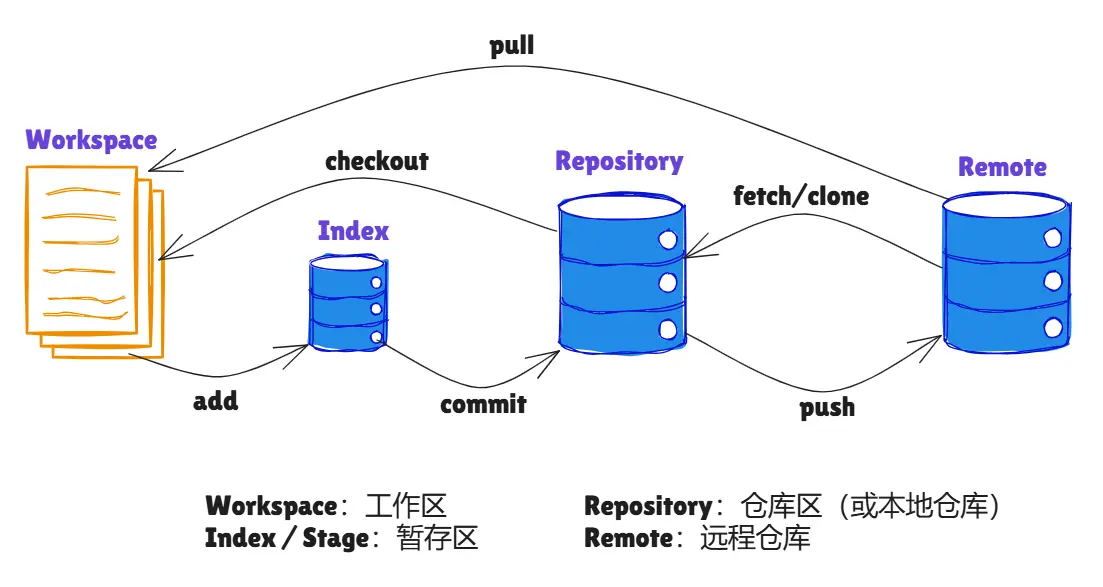
图例
安装
创建新仓库
# 创建一个项目目录mkdir example-projectcd example-project
# 进行git初始化git init配置
.gitconfig —> 用户目录下(全局配置),也可以在项目目录下(项目配置)
# 显示当前的git配置git config --list
# 编辑git配置文件git config -e [--global]
# 设置提交代码是的用户信息git config [--global] user.name "[name]"git config [--global] user.email "[email address]"新添/删除文件
# 添加指定文件到暂存区git add [file1] [file2] ...
# 添加指定目录到暂存区,包括子目录git add [dir]
# 添加当前目录的所有文件到暂存区git add .
# 添加每个变化前,都会要求确认# 对于同一个文件的多处变化,可以实现分次提交git add -p
# 删除工作区文件,并且将这次删除放入暂存区git rm [file1] [file2] ...
# 停止追踪指定文件,但该文件会保留在工作区git rm --cached [file]
# 改名文件,并且将这个改名放入暂存区git mv [file-original] [file-renamed]代码提交
# 提交暂存区到仓库区git commit -m [message]
# 提交暂存区的指定文件到仓库区git commit [file1] [file2] ... -m [message]
# 提交工作区自上次commit之后的变化,直接到仓库区git commit -a
# 提交时显示所有diff信息git commit -v
# 使用一次新的commit,替代上一次提交# 如果代码没有任何新变化,则用来改写上一次commit的提交信息git commit --amend -m [message]
# 重做上一次commit,并包括指定文件的新变化git commit --amend [file1] [file2] ...分支
# 列出所有本地分支git branch
# 列出所有远程分支git branch -r
# 列出所有本地分支和远程分支git branch -a
# 新建一个分支,但依然停留在当前分支git branch [branch-name]
# 新建一个分支,并切换到该分支git checkout -b [branch]
# 新建一个分支,指向指定commitgit branch [branch] [commit]
# 新建一个分支,与指定的远程分支建立追踪关系git branch --track [branch] [remote-branch]
# 切换到指定分支,并更新工作区git checkout [branch-name]
# 切换到上一个分支git checkout -
# 建立追踪关系,在现有分支与指定的远程分支之间git branch --set-upstream [branch] [remote-branch]
# 合并指定分支到当前分支git merge [branch]
# 选择一个commit,合并进当前分支git cherry-pick [commit]
# 删除分支git branch -d [branch-name]
# 删除远程分支git push origin --delete [branch-name]git branch -dr [remote/branch]远程同步
# 下载远程仓库的所有变动git fetch [remote]
# 显示所有远程仓库git remote -v
# 显示某个远程仓库的信息git remote show [remote]
# 增加一个新的远程仓库,并命名git remote add [shortname] [url]
# 取回远程仓库的变化,并与本地分支合并git pull [remote] [branch]
# 上传本地指定分支到远程仓库git push [remote] [branch]
# 强行推送当前分支到远程仓库,即使有冲突git push [remote] --force
# 推送所有分支到远程仓库git push [remote] --all撤销
# 恢复暂存区的指定文件到工作区git checkout [file]
# 恢复某个commit的指定文件到暂存区和工作区git checkout [commit] [file]
# 恢复暂存区的所有文件到工作区git checkout .
# 重置暂存区的指定文件,与上一次commit保持一致,但工作区不变git reset [file]
# 重置暂存区与工作区,与上一次commit保持一致git reset --hard
# 重置当前分支的指针为指定commit,同时重置暂存区,但工作区不变git reset [commit]
# 重置当前分支的HEAD为指定commit,同时重置暂存区和工作区,与指定commit一致git reset --hard [commit]
# 重置当前HEAD为指定commit,但保持暂存区和工作区不变git reset --keep [commit]
# 新建一个commit,用来撤销指定commit# 后者的所有变化都将被前者抵消,并且应用到当前分支git revert [commit]
# 暂时将未提交的变化移除,稍后再移入git stashgit stash pop生成一个可供发布的压缩包
git archive推荐阅读
看完看懂阮一峰老师的这几篇文章,也算是能入门了。
(完)
支持与分享
如果这篇文章对你有帮助,欢迎分享给更多人或打赏支持!
相关文章智能推荐
1
系统集成笔记19-输入输出工具技巧
软考系统集成软考笔记
2
系统集成笔记18:背诵卡片
软考系统集成软考笔记
3
系统集成笔记-17:法律法规和标准规范
软考系统集成软考笔记
4
使用 Dynamics 365 Workflow Tools
Dynamics 365使用 Dynamics 365 Workflow Tools
5
系统集成笔记-16:监理基础知识
软考系统集成软考笔记
随机文章随机推荐
评论区
欢迎来到我的博客!这是一则示例公告。
文章
86
分类
12
标签
43
总字数
131,788
运行时长
0 天
最后活动
0 天前
站点域名mgrowup.com
Fireflyv6.16.5
Astrov7.2.4
Nodev24.21.0
pnpmv11.22.0
构建时间2026年10月18日 23:08:37
系统信息Linux / x86_64